Community · October 1, 2026 · 11 min read
How to Tip Creators on Whistlr Straight From Their Profile, No Live Stream Required
How to tip creators on Whistlr from their profile with the pink Send a Gem button, how creators turn Tips on, and how to keep tipping generous, not awkward.
To tip creators on Whistlr, go to their profile and tap the pink Send a Gem button, choose how many Gems to send, decide whether to put your name on it, and confirm. You don't need to catch them live. The button appears where Follow used to be once you follow a creator who has turned Tips on. Tips use the same WTC Gems people already send during streams, so there's no new currency to learn. For creators, Tips are opt-in from Creator Studio, run through your connected Stripe account, and land in your Creator Wallet with everything else you earn. Below is the full picture for both sides, plus a few habits that keep tipping feeling like generosity rather than obligation.
What are Tips on Whistlr?
Tips are Gems sent directly to a creator from their profile, whenever you want. The difference from live-stream Gems is only where and when. Stream Gems happen inside a broadcast, in real time, as part of the show. Tips happen on the creator's page, on your schedule: after a post you loved, on their birthday, when they hit a milestone, or just because.
- Fans tip from the profile, any time, with no stream needed.
- It runs on WTC Gems, so supporters use the same Gems they already send live.
- Creators keep the large majority of every tip, and the exact split is shown in Creator Studio.
- Tips pass through the creator's Stripe connection into their Creator Wallet.
- It's off by default. Creators choose to switch it on, and can switch it off again whenever they like.
Why we built Tips: support shouldn't depend on catching a stream
Live streaming is one of the best things about Whistlr, and stream Gems are one of the most loved ways to back a creator. But not every creator streams, and not every fan can show up live. Plenty of people build their audience through Minis, posts, photo sets, music, art and Stories. Plenty of fans watch on their own time, on a 7am commute or at midnight after a shift, long after any broadcast ended. For both groups, support was tied to a moment they were never going to be in.
The feedback was consistent. Fans wanted to support creators whose posts they loved and didn't know how unless that creator happened to be live. Creators who made great work outside streaming felt they were leaving support on the table. Not because their audience didn't care, but because care had no easy way to become something tangible. Tips give it a way, built into the one place every fan eventually visits: the profile.
There was a lot of genuine appreciation on Whistlr with nowhere to go. If you love what someone makes, you shouldn't have to wait for them to go live to tell them in a way that actually helps.
— The Whistlr product team
How to tip creators on Whistlr, step by step
If you're a fan, the whole thing takes a few seconds.
- Open the creator's profile. Tap their name or picture from any post, Mini, comment or search result.
- Find the pink Send a Gem button. If they have Tips on and you already follow them, it sits where the Follow button used to be.
- Choose how many Gems to send. Pick what feels right for you. Small tips are as welcome as big ones.
- Decide how you show up. Attach your name so they know it was you, or keep your support private.
- Confirm. The tip goes to the creator, and they're notified that someone backed them.
No Gems yet? You can pick up a Gem pack through Whistlr's standard purchase flow, using the same secure payment options as elsewhere on the platform. Packs come in a range of sizes, so you can match support to what you're comfortable spending.
What happens after you send a tip
Tipping on Whistlr is designed to feel like a moment between two people, not an invisible transaction. The creator sees that someone appreciated their work enough to back it, and if your name was attached, they know it was you. A lot of creators make a point of thanking supporters personally, in a reply, a shout-out in their next post, or a mention on their next stream.
Why can't I see the Send a Gem button?
This is the question we expect most, so here's a quick checklist.
| What you see | Likely reason | What to do |
|---|---|---|
| A regular Follow button | You don't follow this creator yet | Follow them first. The pink button replaces Follow for people who already follow. |
| Following, but no pink button | The creator hasn't turned Tips on | Support them in other ways, like stream Gems, comments and shares. Tips are their choice. |
| A request to send money somewhere else | Not a Whistlr tip | Don't pay. Report it. Real tips only happen through the pink button in the official app. |
The follower rule is deliberate. For someone who already follows you, the Follow button has done its job. Turning that spot into a way to support you gives your most engaged fans an obvious path, while people discovering you for the first time still see the familiar Follow button. Growing your audience works exactly as it always has.
How creators turn on Tips on Whistlr
If you're a creator, turning Tips on takes a few minutes and puts a permanent, low-pressure way to support you right on your profile.
- Open Creator Studio from your profile, where your monetization settings live.
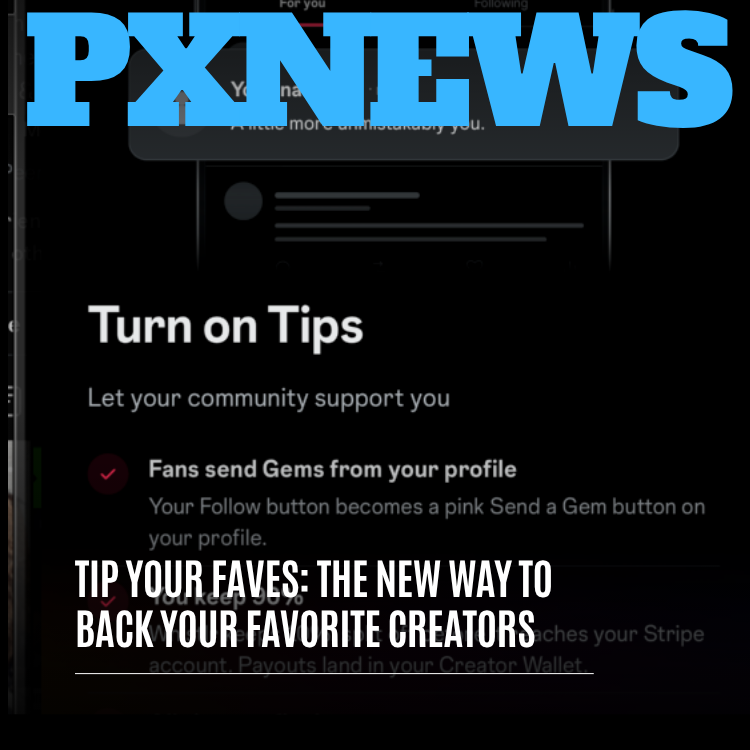
- Find Turn on Tips in your monetization options. The screen explains exactly what changes when Tips are enabled.
- Connect or confirm your Stripe account. If you don't have one connected, the guided setup walks you through it. If you already earn on Whistlr, you just confirm the existing connection.
- Review what supporters will see, with the pink Send a Gem button in place of Follow for your followers.
- Turn it on. Supporters can start backing you right away, and every tip lands in your Creator Wallet.
The profile is where people go when they care about someone. Putting support in the spot your biggest fans already look at felt obvious once we saw it. The button doesn't ask for anything. It just makes backing someone easy when you already want to.
— The Whistlr product team
Tips vs live-stream Gems vs subscriptions: which should you use?
Whistlr now has several ways to back a creator, and each suits a different kind of support. None of them compete. A fan might tip after a post, send Gems during the weekly stream, and buy something from the storefront later in the year.
| Way to support | When it fits best | Where it happens |
|---|---|---|
| Tips | Spontaneous thanks for a post, a milestone, or just because | The creator's profile, any time |
| Live-stream Gems | Being part of the moment while a broadcast is happening | Inside a live stream, in real time |
| Subscriptions | Backing someone consistently and getting ongoing access to subscriber-only content | A recurring plan |
| Storefront purchases | Wanting something tangible, like merch, products or digital goods | The creator's storefront on Whistlr |
A tip is a one-time gesture tied to how you feel today. It isn't a commitment, and it doesn't come with access to anything. That's what makes it so easy to give. For creators, offering several ways to support means fans can back you in whatever way fits their habits and budget, and because it all flows into one Creator Wallet, adding Tips doesn't make getting paid more complicated.
Which creators benefit most from Tips?
Any creator can turn Tips on. A few kinds of creators will feel the difference immediately, because their work doesn't always happen live.
Creators who don't stream
Illustrators, photographers, writers, comedians and anyone building an audience through Minis and posts now have a direct way for fans to support them without ever going live. For many of them, Tips are the first time their audience's appreciation can turn into income on Whistlr.
Musicians and emerging artists
Emerging artists often share work long before they have the audience for big live events. Tips let early fans back an artist from the very beginning, which can matter a lot to someone trying to grow.
Streamers between streams
A fan three time zones away who always misses the stream can still say thanks. So can a regular who wants to tip the morning after a great broadcast.
Smaller creators
Whistlr has always held that you don't need a huge following to start earning. Tips make that more true. A small, engaged community can support a creator meaningfully without anyone needing to hit an audience milestone first.
How to tip creators on Whistlr thoughtfully: a guide for fans
Tipping works best when it feels generous and deliberate. A few habits help.
- Set a budget in advance. A monthly amount you're comfortable with is easier to stick to than deciding fresh every time a post moves you, and it naturally spreads support across more creators.
- Tip for specific moments. Right after a post that really landed, a milestone or something personal they shared. Add a quick comment about what you loved so they know what worked.
- Save some for smaller creators. A tip to someone with a huge audience is appreciated. A tip to someone just starting out can change their whole week.
- Never feel pressured. Following, watching, commenting and sharing are all real support. Nobody should feel they have to send Gems to be a good fan.
How creators can receive tips without making it awkward
A lot of creators worry that turning Tips on will feel like asking for money. In practice it rarely does, as long as you treat it as an open door rather than a collection plate. Some regulars will tip after every post, some never will, and they're all equally part of your community.
- Say thank you, and mean it. A personal reply, a shout-out or a mention on stream goes a long way. Supporters remember creators who notice them.
- Mention Tips once. A single friendly note that Tips are on is plenty. Asking repeatedly wears down goodwill.
- Share what support makes possible. If tips are funding new gear, more time to create or a specific project, tell people. It makes them part of it.
- Keep making the work. The best way to earn tips is the same as the best way to earn followers.
- Watch your Creator Studio insights to see which posts inspire tips, and learn what resonates.
Where tips go once they're sent
Every tip is processed through your connected Stripe account and appears in your Creator Wallet, labeled as a profile tip so you can tell it apart from stream Gems, subscriptions and storefront sales. After a short settling period, tips move into your available balance alongside everything else you've earned.
Getting paid then works the same as for the rest of your Whistlr income. You can take an instant withdrawal for a small convenience fee that's always shown before you confirm, or a business withdrawal on the standard payout timeline at no added cost. There's no separate process to learn for tips.
Tip scams on Whistlr and how to stay safe
Money and community can be a delicate mix, so we built Tips with guardrails. Supporters can tip with their name visible or privately. Creators stay in control and can turn Tips off at any time. All tipping activity falls under Whistlr's community guidelines, and the teams that protect the platform around the clock watch for suspicious activity and anyone trying to misuse tipping.
The one rule to remember: legitimate tips on Whistlr only happen through the pink Send a Gem button inside the official app. If anyone messages you asking for money outside Whistlr, promises rewards in exchange for tips, or claims to be a creator's "manager" collecting support on their behalf, don't engage. Report it. Real creators don't need you to leave the app to support them.
Frequently asked questions
How do I tip a creator on Whistlr?
Open the creator's profile and tap the pink Send a Gem button, which replaces the Follow button once you follow a creator who has Tips turned on. Choose how many Gems to send, decide whether to include your name, and confirm. The tip goes straight to the creator, who gets notified that someone backed them.
Do I need to watch a live stream to tip someone?
No. Live-stream Gems are sent during a broadcast, but Tips are sent from a creator's profile whenever you like. That means you can support creators who never stream, like illustrators or photographers, and you can thank streamers after a broadcast ends or when you're in a different time zone and missed it.
Why don't I see the Send a Gem button on a profile?
Either you don't follow that creator yet, or they haven't turned Tips on. The pink Send a Gem button only replaces Follow for people who already follow a creator with Tips enabled. If you follow them and still see no button, Tips are off, and you can support them through stream Gems, comments and shares instead.
How do creators turn on Tips?
Open Creator Studio, go to your monetization options and choose Turn on Tips. Connect a Stripe account through the guided setup, or confirm the one you already use, then review how your profile will look and switch it on. Your followers will see the pink Send a Gem button, and tips land in your Creator Wallet.
How much of a tip does the creator keep?
Creators keep the large majority of every tip. The exact split between the creator and Whistlr is shown clearly in Creator Studio on the Turn on Tips screen, so creators know precisely what they'll receive before enabling the feature. Tips then appear in the Creator Wallet, labeled as profile tips, alongside other Whistlr earnings.
Can I tip a creator anonymously?
Yes. When you send a tip, you choose whether to include your name so the creator knows it came from you, or to keep your support private. Either way the Gems reach the creator in the same way. Private tips are a good option if you want to back someone quietly without drawing attention.