Guides · October 21, 2026 · 10 min read
How to Grow a Community With the Whistlr Discovery Feed: A Playbook for SubCircuits, Havens and Live Streams
Use the Whistlr discovery feed to grow your community: how SubCircuits, Havens and live streams get found by explorers, plus a step-by-step playbook that works.
If you want strangers to find your community on Whistlr, the discovery feed is where to focus. It's what appears the moment you tap search, before any typing, and it draws from the entire app rather than only accounts someone already follows. One of its sections exists purely to spotlight the communities picking up members fastest. Getting there doesn't require a massive audience or an ad budget. It requires a group that's genuinely active and a front page that makes sense in a few seconds.
Most communities begin as a small knot of people united by one obsession. On Whistlr, those first friends and followers matter enormously. Still, any group that wants to last eventually needs newcomers who stick around. Below we break down what the discovery feed contains, how SubCircuits, Havens, creators and live hosts end up in it, a practical growth plan with no tricks involved, and how to convince the people who tap in to stay.
What is the Whistlr discovery feed?
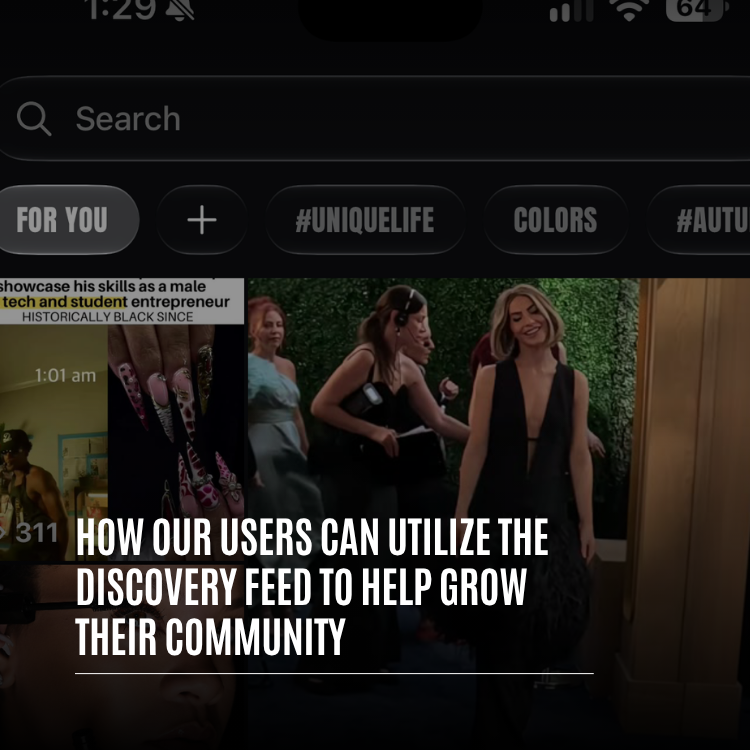
Tapping search on Whistlr no longer opens an empty box. It opens a scrolling page made for moments when you'd like the app to surprise you. Working down from the top, you pass through a string of sections, and each one leads somewhere different.
| Section | What you'll find |
|---|---|
| Featured carousel and hashtag ticker | Highlighted moments up top, plus a moving strip of tags you can open with a tap |
| Live now | Broadcasts and live rooms in progress, and a "Watch all" link for the full lineup |
| Minis | A row of short videos and an entry point to the complete Minis experience |
| What everyone's talking about | A ranked top ten of current hashtags, each labeled with how many posts use it |
| Trending posts | Posts gaining traction across Whistlr |
| Join the conversation | Communities adding members fastest and the most hotly debated threads, plus a link to browse every community |
| Music from Waves | Playlists and fresh releases, with a jump into Waves |
| News and featured posts | Newly published stories and featured posts to read |
| Keep exploring | A never-ending mix of posts and Minis once the curated sections run out |
Search itself never leaves the top of the screen. Tapping into it shows what you looked up recently, suggested hashtags under "You may like" (with a Refresh option for more) and current trends. As you type, suggestions pop up immediately across people, hashtags, songs, posts and communities. Full results are split into tabs including Trending, Minis, Waves, Communities, Hashtags and Flow, the home of live streams.
Why the discovery feed is the best place to grow a Whistlr community
Whistlr is mostly organized around the people you already know. Home leads with friends, and a recommendation from someone you trust outranks a viral post from a stranger. That's a big part of why the app feels personal. The flip side is that reaching beyond your circle calls for a space designed for introductions, and that's the job the discovery feed does.
Visitors arrive curious
Nobody lands on the discovery feed by accident; they tapped search hoping to find something good. Compare that to someone lazily scrolling posts from people they already follow. The explorer is far more likely to open your community, poke around and hit join.
Communities have a dedicated slot
Groups aren't squeezed in as an afterthought. "Join the conversation" is there specifically to feature the fastest-growing communities beside the busiest threads. That creates a flywheel: a SubCircuit gaining momentum gets placed in front of explorers, explorers join, and the extra activity keeps it there.
Momentum beats headcount
What matters most for community builders is what's happening this minute: groups adding members quickly, threads with lively debate, tags collecting new posts, streams that are on air. None of those depend on a giant follower count, only an engaged one. A brand-new community where people are really talking can land beside groups many times larger.
Friends are a community's first audience. Discovery gives it a second shot at being found, and we designed it so small, busy groups get that shot too, not only the biggest names.
— The ETAPX team
How your community shows up in the discovery feed
There are several routes into the feed, and different groups tend to use different ones. Here's how each works and what you can do about it.
Join the conversation
This section displays community cards topped with their banners next to the threads generating the most discussion. It's the most direct path for a SubCircuit owner. Two things carry the most weight. First, presentation: the card opens with your banner, and a deliberate, well-made one says "come in," while a default placeholder says "nobody's home." Second, conversation: one thread that gets people arguing in good faith can be precisely what tempts a curious visitor through the door.
Hashtags everywhere
Tags pop up all over the feed: scrolling in the ticker, ranked in "What everyone's talking about," suggested under "You may like" and gathered in the Hashtags tab. For a community, one shared tag acts like a banner flying over everything members post. When people apply it to their Minis, threads and posts, it accumulates content, gets easier to stumble on and leads back to your group. Choose something brief, specific and memorable, and use it without fail.
Live now
Broadcasts and live rooms are featured while they're on air, and Flow streams have a dedicated tab in results. A watch party, a weekly Q&A, a live audio room digging into a topic or a stream from an event your members are attending can all reach people hunting for something to watch. Dropping into a busy room where your members are chatting makes a much stronger first impression than reading a static page.
Minis and trending posts
Plenty of people meet a community through a clip before they realize the community exists. A Mini that captures your group's personality, a recap of a meetup, a stream highlight or a funny exchange from a thread can travel well beyond your membership. Whistlr's discovery surfaces are paying more and more attention to what viewers finish and return to, so clips that hold attention to the end outlast ones built only for a flashy first second.
Search results
Some people skip browsing and type exactly what they want. Searching a topic brings up matching groups in the Communities tab, and suggestions surface them mid-typing. That's why wording matters: a name, handle and description that plainly state your focus help search connect you with the right people.
How to use the discovery feed to grow your community, step by step
There's no hack here and no paid boost. The goal is a community that's simple to understand, simple to find and worth sticking with. This plan suits SubCircuits, Havens and creator communities equally.
- Fix the front door. Your name, handle, banner and description should spell out who the group is for and what goes on inside. Explorers make up their minds in seconds.
- Plant real activity. Write the threads you'd love to stumble on, and recruit a small founding crew who will actually participate. The communities section favors groups that are growing and talking.
- Adopt a signature tag. One short, specific hashtag that members add to relevant posts, Minis and threads.
- Run a recurring thread. A weekly prompt, challenge or showcase gives people a reason to post and generates noticeable discussion.
- Go live on schedule. Each regular stream or audio room is another chance to appear while explorers are looking for something to watch.
- Clip your best moments into Minis. Highlights, event recaps and standout threads make great short videos; name your community so viewers know where to go next.
- Greet every first post. When a newcomer from discovery says hello, respond. A fast, warm reply turns a visitor into a regular.
- Measure and adjust. Creator Insights in Creator Studio reports where your audience comes from, search included, so you can tune titles, tags and topics.
What the first month can look like
Spread over four weeks, the plan stops feeling like a to-do list and starts feeling like a routine. Here's one way to pace it if you're starting from a quiet group.
- Week one: rewrite the description, replace the banner, choose your tag and post three or four threads you'd genuinely want to answer yourself.
- Week two: launch the recurring thread and invite the handful of people most likely to reply to it.
- Week three: host your first live session around that thread, then cut its best minute into a Mini that names the community.
- Week four: open Creator Insights, see which sources sent people your way, and double down on whatever worked.
None of those steps needs a big audience. They need consistency, and consistency is exactly what the discovery feed notices.
How to turn discovery visitors into community members
Being found only gets someone to your doorstep. Whether they come in and stay depends on what they see next.
- Explain yourself up top. A pinned welcome thread or post should say what the group is about, how to jump in and what's on the calendar. A newcomer ought to figure out how to participate within a minute.
- Keep the rulebook short. Four to eight crisp rules that people will read beat a long list nobody opens, and they show the group is cared for.
- Offer an easy opener. First posts are intimidating, so give low-stakes prompts: say hi, name a favorite, share a photo of your setup.
- Link your spaces together. If your group also has a Haven where you meet, a regular stream and your own profile, each should point to the others. Mention the Haven in your SubCircuit, plug the SubCircuit on stream and make your profile clear about where the community lives.
Discovery feed strategies for different kinds of communities
The plan above works broadly, but each type of group leans on different parts of the feed.
| Type | Lean on | In practice |
|---|---|---|
| SubCircuits | Join the conversation, plus search results | A strong banner, busy threads and steady growth |
| Havens | The discovery feed together with Nearby | Post Minis from the location, use a place-based tag and stream from the spot |
| Fan communities around a creator | Live now, Minis and trending posts | Content is the entry point; the community is where fans get closer |
| Local businesses | Hashtags and Minis | Show off the space, the products and the regulars to people who haven't visited |
| Music communities | Waves and live rooms | Shared playlists and listening sessions as the way in |
How the discovery feed fits with Trending, Highlights and your home feed
Whistlr spreads content across several surfaces, and each contributes to growth in its own way.
- Home: friends lead, the wider world follows. Existing members and followers see your group's activity here.
- Trending: what's taking off across Whistlr right now, tilted toward content people finish and come back to.
- Highlights: a curated reel of standout clips and peak moments for someone with only a few minutes.
- Discovery: built for finding things new to you, from fast-growing communities and popular tags to whatever is live.
Thriving groups appear on all of them. Members spot you on Home, your strongest posts can reach Trending and Highlights, and discovery is where total strangers first catch a glimpse of you.
Will private communities show up in the discovery feed?
No. Visibility on Whistlr is always your decision. Discovery only features content and communities that are already public. With a public profile, your posts are eligible to appear there; with a private one, only friends see them and they're excluded from public discovery. Private communities remain closed, and your other privacy settings keep governing how your account and posts are shown.
For organizers, that means you control how findable your group is. A public SubCircuit or Haven is open to anyone exploring; a private one stays restricted to whoever you let in. Lots of groups run one of each: a public space for recruiting and a private one for the inner circle.
Quick tips for growing on the Whistlr discovery feed
- Narrow your focus. A specific group with a clear description is easier to find and join than one about everything.
- Invest in the banner, since every community card opens with it.
- Stick to one tag so members' posts form a trail home.
- Host conversations worth joining; busy threads get featured in Join the conversation.
- Stream regularly to stay visible while people browse for something to watch.
- Make inviting Minis and tell viewers where the community lives.
- Answer first posts quickly; that first reply decides whether people return.
- Watch Creator Insights to see whether discovery and search are paying off, and refine.
People browsing discovery are hoping to find somewhere they fit. If your community is easy to locate, easy to grasp and easy to join, the next person who taps in could become a member for years.
Frequently asked questions
What is the Whistlr discovery feed?
It's the scrolling page you see after tapping search, before typing. It features live streams, Minis, the ten most-used hashtags right now, trending posts, fast-growing communities, Waves music, news and an endless "Keep exploring" section, with search pinned at the top.
How do I get my community featured in the Whistlr discovery feed?
Keep it busy and growing. "Join the conversation" spotlights the communities adding members fastest along with the most discussed threads. A clear banner and description, lively threads, one consistent hashtag and regular live sessions all help you appear and convert visitors.
Do I need a big following to grow through discovery?
No. The sections that matter for communities reward current activity, such as quick growth, active threads, tags gaining posts and streams on air. A small, engaged group can appear next to much bigger ones.
Will my private community show up in the discovery feed?
No. Discovery only features public content and communities. Private communities stay visible only to approved people, and posts from a private profile are excluded from public discovery.
How can I tell if discovery is bringing people to my community?
Open Creator Insights in Creator Studio. It shows where your audience comes from, including search, so you can watch how that changes as you adjust your banner, tags, threads and live schedule.