Guides · September 28, 2026 · 11 min read
How to Get Discovered on Whistlr: A Creator's Guide to the Search Feed
How to get discovered on Whistlr through the Search feed: what it shows before anyone types, why it favors clear titles, and a checklist for streams and posts.
If you want to know how to get discovered on Whistlr by people who don't follow you yet, start with the Search feed. Tapping search no longer opens a blank page. It opens a browsable feed of live streams happening right now, music worth playing, creators on the rise and content people are actively looking for, with the search bar still sitting at the top. The people who land there have just told the app they want to find something. Clear titles, honest live categories, a specific profile and a steady rhythm are what put you in front of them. Here's how the screen works, why we built it, and exactly what to do about it as a creator.
What does the Whistlr Search feed show?
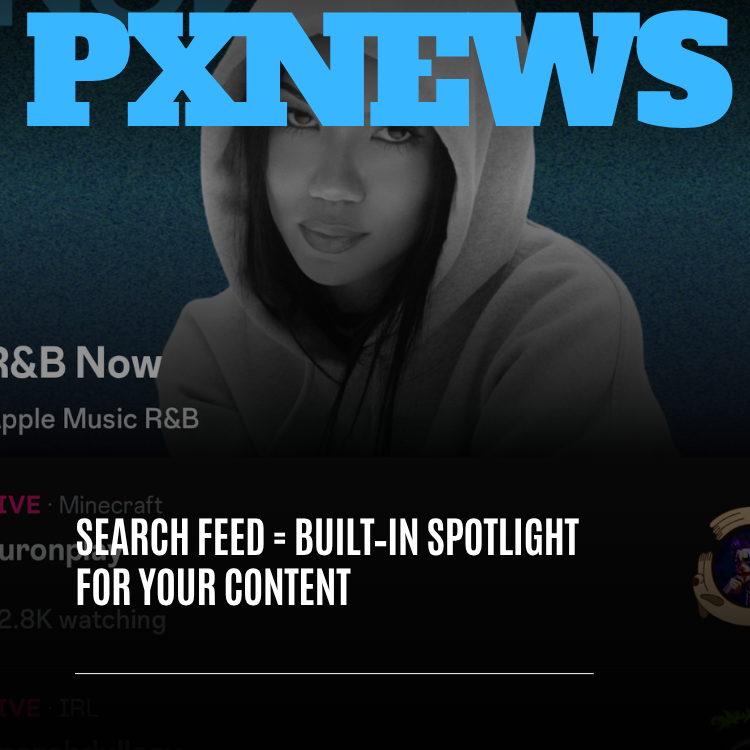
Search lives at the right edge of Whistlr's top navigation bar. Tap it on any given day and, before you type a single letter, you'll see a mix that reflects the whole platform rather than one corner of it.
- Live streams happening now, clearly marked LIVE, labeled with their category (gaming, IRL, music and more) and showing how many people are watching.
- Music from Waves, including Apple Music-powered collections, sitting alongside everything else so finding something to listen to doesn't mean switching apps.
- Creators gaining momentum, especially ones outside your usual orbit.
- Minis, posts and moments that people across the community are actively searching for.
- The search bar itself, for when you already know exactly what you want: a creator, a Circuit, a song or a topic.
The short version: search used to be a tool. It's now also a place. It still does the lookup job perfectly well, and it rewards you for opening it even when you didn't have a query in mind.
Why we replaced the blank search page
Search screens have historically been empty because they were designed around one assumption: you already know what you're looking for. Type a name, get a result, leave. That works when you're hunting for one account. It works badly for the far more common situation, where you open the app with a vague itch. You want to watch something. You want new music. You want to see who's live.
Whistlr has been moving away from black-box discovery for a while. When we retired the old Explore and For You tabs, we replaced them with clearly named destinations: Trending, Discover, Waves, Flow, Circuits and Highlights. Search sits at the right edge of that same bar for the moments you want to go straight to something. The Search feed carries that thinking one step further. Even the screen built for finding specific things should help you find things you didn't know to look for.
People also search socially in a looser way than they search the web. They look for moods, topics and vibes as often as they look for names. A search screen that only responds to precise queries leaves most of that intent on the table, so the feed and the bar live together. Scroll the live rooms for a minute, then type the moment something sparks. Or arrive with a query, find it, and notice a stream right below it you didn't know you wanted.
Tapping search is one of the most intentional things anyone does in an app, and for years the industry answered it with an empty page. We wanted that moment to meet people halfway, and to give creators a real chance of being what they find.
— The Whistlr product team
Why the Search feed matters for getting discovered on Whistlr
Every creator runs into the same wall. Your followers already see your work. Growth means reaching everyone else. The Search feed is one of the most useful places on Whistlr to do that, for three reasons.
The audience is already looking
Someone half-scrolling a feed on autopilot is a different person from someone who just tapped search. The second one is actively choosing. When your stream, Mini or profile shows up in front of that mindset, the chance that they tap, stay and follow is meaningfully higher.
Live rooms show up while they're live
A stream doesn't have to become a highlight to get noticed. When you go live, your room can appear among the live streams on the Search feed, with your category and viewer count visible at a glance. That's a direct, real-time path from pressing Go Live to being found by someone looking for exactly that kind of stream.
It rewards being easy to understand
Search is where clear titles, honest categories, well-described profiles and consistent topics pay off most directly. If it's obvious what your content is about, search can confidently put it in front of the right people. If it isn't, search has nothing to go on.
Picture a producer streaming at 11pm with thirty people in the room, making lo-fi beats and taking requests. With a blank search page, the only way a new viewer found that stream was by already following the producer or getting lucky in a feed. Now someone opens search at 11:05 wanting something calm to work to, sees a music category label and a small, cozy room, and taps in.
How to get discovered on Whistlr through search: a creator checklist
Nobody can honestly promise you a trick for ranking in search, and we won't pretend there is one. What does exist is a set of habits that make your content easier to understand, easier to match to what people are looking for, and more likely to surface when it's relevant.
- Write titles people would actually search for. Your stream title, Mini caption or post description is often the first thing search uses to understand your content. Be clear before you're clever.
- Pick the right live category every time. The category is shown on your room in the Search feed, so it does real work. Choose the one that honestly describes the stream, not the one you think is busiest.
- Make your profile describe you. Your profile is your storefront in search. A specific description of who you are and what you make helps search match you to people looking for exactly that.
- Stay consistent in what you cover. You can post outside your lane, but a recognizable set of topics builds an identity search can connect to the right audience over time.
- Go live on a rhythm. Because the Search feed spotlights what's live now, regular streams mean regular chances to be found, and a schedule tells first-time viewers when to come back.
- Make it worth staying for. Whistlr's discovery surfaces pay increasing attention to what people finish and return to. Content that earns the watch-through holds up far better than content built to win three seconds.
Writing stream titles and captions search can understand
The single highest-leverage change most creators can make is in the title. Inside jokes delight your regulars and tell a newcomer nothing. A good title answers two questions: what is this, and why would I join now? Here are a few rewrites to show the pattern.
| Vague title | Clear title | What changed |
|---|---|---|
| back at it lol | Late-night lo-fi beat making, taking requests | Says the activity and invites participation |
| day 47 | Day 47 of building a cozy Minecraft village from scratch | Keeps the series hook and names the game and goal |
| chaos | One-pan lemon pasta in 15 minutes, start to finish | Uses the words a hungry person would type |
| come hang | Sunday morning IRL walk through the farmers market, Q&A | Sets the scene and the format |
Notice that the clear titles still have personality. You don't have to write like a product listing. You just have to put the searchable words somewhere a stranger can see them. The same goes for profile descriptions: "Bay Area home cook, weeknight recipes under 30 minutes, live Sundays" will match far more intent than a single emoji and a quote.
How to see your search traffic in Creator Insights
You don't have to guess whether any of this is working. Creator Insights in Creator Studio shows where your audience comes from, broken down across search, profiles, feeds, reposts and recommendations. It also highlights which titles, captions and topics are helping people find your content.
Use it like a simple experiment. If search is already a strong source of traffic, your titles and topics are doing their job and it's worth leaning in. If it's a thin slice, try clearer titles, tighter topics or a sharper profile description for a few weeks, then compare. Change one thing at a time so you can tell what moved the number.
Search feed vs Trending vs Discover: which surface does what?
Whistlr has several discovery surfaces, and they're designed to complement each other rather than compete. Knowing the difference helps you decide where to browse and where your content has the best shot.
| Surface | What it's for | What helps creators show up |
|---|---|---|
| Search feed | Moments of intent: what's live, music, and what people are actively looking for | Clear titles, honest categories, a specific profile, regular streams |
| Trending | The pulse of the whole community right now | Content people watch through and come back to, not just fast reactions |
| Discover | Wandering: fresh voices and creators outside your usual circle | A distinct point of view worth following |
| Highlights | Standout clips and peak moments when you only have a few minutes | Moments strong enough to stand on their own |
Trending shows you what the community is collectively into. Discover invites you to roam. The Search feed is the one that meets people at the exact moment they're trying to find something, which is why it's so valuable both for viewers and for anyone trying to be found.
Does the Search feed favor big creators?
It would have been easy to build a search screen that always showed the biggest accounts and the most-watched streams. That kind of design turns discovery into a closed loop where the popular get more popular and everyone else fights over scraps. We didn't want that, and it runs against how we've approached discovery generally.
Friend-first discovery says a recommendation from someone you know matters more than an algorithm's guess about a stranger. The rebuilt Trending tab says what people genuinely finish matters more than what makes them flinch. The Search feed brings the same values to the moment of intent: show what's genuinely alive and relevant, give rising creators a real window next to established ones, and respect that the person tapping search came to find something worth their time.
In practice, a live room with a few dozen people can sit on the same screen as a packed one. The viewer count is there to help someone read the room. It doesn't decide on its own whether a stream deserves to be seen.
Discovery shouldn't belong only to creators who already have an audience. A small room and a packed one can sit side by side, and someone looking for exactly that small room's vibe should be able to find it.
— The Whistlr product team
What can appear in the Search feed, and what stays private
A more visible search experience raises a fair question: what if you don't want to be found? The Search feed only spotlights content and creators that are already public on Whistlr. Private spaces stay private, and your privacy settings continue to shape how your account and content appear to other people.
For creators, that makes the spotlight something you opt into through what you choose to share publicly: your live streams, public posts, Minis and profile. For everyone else, discovery happens without touching the personal, friend-first side of Whistlr. Your Circle, your private posts and your group chats aren't search inventory.
What's next for search on Whistlr
The Search feed is rolling out now, and we see it as a foundation. Search is one of the most-used entry points in any social app, so making it useful for the people searching and the creators being searched for is ongoing work rather than a single launch.
Expect continued tuning in how live streams, music, creators and content are balanced on the screen, and in how well search understands what people mean, not just what they type. That direction will be shaped by how people actually use it. Until then, the advice stays simple: describe your work clearly, categorize it honestly, show up regularly, and make something worth staying for.
Frequently asked questions
What is the Whistlr Search feed?
The Whistlr Search feed is the screen you see when you tap search at the right edge of the top navigation bar. Instead of a blank page, it shows live streams happening now, music from Waves, rising creators and content people are actively looking for. The search bar stays at the top for specific queries like a creator, Circuit or song.
How do I get my content into Whistlr search?
Write clear, descriptive titles and captions, choose the right category whenever you go live, keep a specific profile description, and stay consistent in the topics you cover. Going live on a regular schedule gives you more chances to appear among live streams. There's no guaranteed trick, but these habits make your content easier for search to understand and match.
Do live streams show up in the Whistlr Search feed?
Yes. Live streams are a core part of the Search feed. Each one is clearly marked as live, labeled with its category such as gaming, IRL or music, and shows a live viewer count. That lets viewers quickly spot a stream that fits their mood, and it gives creators a real-time path to being found while they're on air.
Can small creators get discovered through Whistlr search?
Yes. The Search feed is designed to give smaller and rising creators a real window alongside established ones. A live room with a modest audience can appear on the same screen as a packed one, because viewer counts help people read the room rather than deciding visibility alone. Clear titles and honest categories help the right viewers find you.
How can I tell if people find me through search?
Open Creator Insights in Creator Studio. It breaks down where your audience comes from, including search, profiles, feeds, reposts and recommendations, and highlights which titles, captions and topics are helping people find your content. Try one change at a time, such as clearer titles, then compare how your search traffic shifts over the following weeks.
How is the Search feed different from Trending?
Trending shows what's catching on across Whistlr right now, weighted toward content people watch through and return to. The Search feed is built for moments of intent. It surfaces what's live, music and what people are actively searching for, and it lets you jump straight to something specific by typing into the search bar at the top.